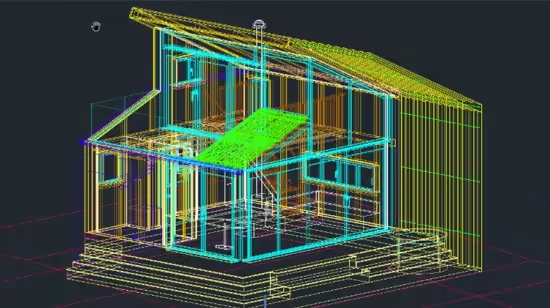
AutoCAD Complete, Easy, and Fast 2D & 3D Course

dkmdkm

U P L O A D E R
892522c090c7e75a85bfcb32e00818d7.avif

Free Download AutoCAD Complete, Easy, and Fast 2D & 3D Course
Published 9/2025
MP4 | Video: h264, 1280x720 | Audio: AAC, 44.1 KHz, 2 Ch
Language: English | Duration: 3h 55m | Size: 1.9 GB
Master 2D Drafting and 3D Modeling in AutoCAD From Basics to Advanced

What you'll learn
This course provides a complete introduction to 2D and 3D drafting and design using AutoCAD software, guiding learners from fundamentals to advanced techniques.
Master all essential AutoCAD tools for 2D drafting and 3D modeling
Create and edit professional 2D drawings using AutoCAD tools for lines, shapes, dimensions, layers, and annotations.
Develop advanced 3D models using solid, surface, and mesh techniques, including Boolean operations and rendering.
Apply real-world drafting workflows by producing architectural plans, elevations, sections, and isometric drawings
Work efficiently with Blocks, Dynamic Blocks, Xrefs, and Sheet Set Manager to streamline large projects.
Prepare professional drawing sets including title blocks, layouts, and plotting for construction or client presentations.
Build industry-ready skills for civil, architectural, mechanical, and electrical drafting projects.
Confidently tackle AutoCAD certification exams and job interviews with applied knowledge and project practice.
Requirements
Basic Computer Knowledge
Computer with AutoCAD Software installed. You are able to download educational version
Description
This course provides a complete introduction to 2D and 3D drafting and design using AutoCAD software, guiding learners from fundamentals to advanced techniques. You will start by mastering the core drawing and modification tools, then progress to building complex 3D models, applying materials. As an industry expert with years of experience, I've designed this course to teach you everything you need to know about AutoCAD in the shortest possible time.You'll gain practical experience creating floor plans, elevations, circuit diagrams, mechanical parts, and structural details. You'll also learn how to manage projects efficiently with Xrefs, Sheet Set Manager, and advanced block creation.By the end of the course, you will be equipped with the skills to take a project from concept to professional output, whether your goal is to pursue a career in architecture, engineering, or design or to enhance your AutoCAD proficiency for certification exams and workplace advancement. The versatile skills you'll gain in drafting, modeling, and visualization can be applied across multiple industries-including architecture, interior design, engineering, construction, manufacturing, and even product design.Getting StartedExploring the AutoCAD for Windows interfaceSetting up drawing units and navigation basicsUnderstanding coordinate systems for accuracyBasic Drawing SkillsDrawing lines, rectangles, circles, arcs, ellipses, polygons, and splinesUsing drawing aids: grid, snap, ortho mode, and polar trackingCanceling, erasing, undoing, and grip editingBlending between objects with curves and splinesProjects & DrawingsDraw floor plans, elevations, sections, site plans, and staircase detailsComplete a full residential building project from start to finishDevelop sectional drawings and isometric viewsPrepare professional drawing sets and project submissionsCore Tools & Editing MethodsCreating selection sets for precise editingMove, copy, rotate, scale, and array commandsTrim, extend, stretch, lengthen, offset, mirror, and alignApply modification tools: fillet, chamfer, explode, and join3D Modeling & SolidsCreate 3D models using solids, surfaces, and meshesModel complex 3D shapes, windows, doors, and roofs from scratchUse solid editing tools: extrude, revolve, loft, sweep, shell, slice, subtract, and unionApply UCS coordinates and dynamic 3D viewsSet up cameras, export views, and manage rendering workflowsCustomization & EfficiencyCreate custom AutoCAD templates and dynamic blocks (doors, windows, furniture)Use Layer States Manager for color profiles and theme-based workConvert units of existing drawings with a single commandWork with Xrefs, Sheet Set Manager, and advanced annotation featuresLearn AutoCAD command shortcuts to speed up workflowAnnotations, Layers & LayoutsCreate and edit text using single-line, MTEXT, and custom text stylesFormat, transform, and manage paragraphs of textWork with dimensions, leaders, and annotation stylesControl object visibility and appearance through layers, linetypes, and propertiesSet up layouts, viewports, page setups, and plotting for printConfigure output devices, create and use plot style tables, and export to electronic formats
Who this course is for
Beginners who want a step-by-step introduction to AutoCAD with no prior drafting or design experience.
Architecture, engineering, and design students who want to strengthen their technical drawing and 3D modeling skills for school projects or portfolios.
Working professionals (architects, engineers, contractors, designers, and drafters) who want to sharpen their AutoCAD skills and improve efficiency in real-world projects.
Career changers or job seekers preparing for AutoCAD certification exams or looking to add industry-recognized software expertise to their résumé.
Anyone interested in design and technology who wants to learn how to create accurate 2D drawings, 3D models, and professional visual presentations.
Homepage
Code:
Bitte Anmelden oder Registrieren um Code Inhalt zu sehen!


Recommend Download Link Hight Speed | Please Say Thanks Keep Topic Live
Code:
Bitte Anmelden oder Registrieren um Code Inhalt zu sehen!

No Password - Links are Interchangeable
 
Kommentar

4a75f821a7edd5ccf0c0b48386d1d597.jpg

AutoCAD Complete, Easy, and Fast 2D & 3D Course
Published 9/2025
Duration: 3h 56m | .MP4 1280x720 30 fps(r) | AAC, 44100 Hz, 2ch | 1.91 GB
Genre: eLearning | Language: English​

Master 2D Drafting and 3D Modeling in AutoCAD From Basics to Advanced

What you'll learn
- This course provides a complete introduction to 2D and 3D drafting and design using AutoCAD software, guiding learners from fundamentals to advanced techniques.
- Master all essential AutoCAD tools for 2D drafting and 3D modeling
- Create and edit professional 2D drawings using AutoCAD tools for lines, shapes, dimensions, layers, and annotations.
- Develop advanced 3D models using solid, surface, and mesh techniques, including Boolean operations and rendering.
- Apply real-world drafting workflows by producing architectural plans, elevations, sections, and isometric drawings
- Work efficiently with Blocks, Dynamic Blocks, Xrefs, and Sheet Set Manager to streamline large projects.
- Prepare professional drawing sets including title blocks, layouts, and plotting for construction or client presentations.
- Build industry-ready skills for civil, architectural, mechanical, and electrical drafting projects.
- Confidently tackle AutoCAD certification exams and job interviews with applied knowledge and project practice.

Requirements
- Basic Computer Knowledge
- Computer with AutoCAD Software installed. You are able to download educational version

Description
This course provides a complete introduction to2D and 3D drafting and design using AutoCAD software, guiding learners from fundamentals to advanced techniques. You will start by mastering thecore drawing and modification tools, then progress to buildingcomplex 3D models, applying materials.As an industry expert with years of experience, I've designed this course to teach you everything you need to know about AutoCAD in the shortest possible time.

You'll gain practical experience creatingfloor plans, elevations, circuit diagrams, mechanical parts, and structural details. You'll also learn how tomanage projects efficiently with Xrefs, Sheet Set Manager, and advanced block creation.

By the end of the course, you will be equipped with the skills totake a project from concept to professional output, whether your goal is to pursue a career in architecture, engineering, or design or to enhance your AutoCAD proficiency for certification exams and workplace advancement.The versatile skills you'll gain in drafting, modeling, and visualization can be applied across multiple industries-including architecture, interior design, engineering, construction, manufacturing, and even product design.

Getting Started

Exploring the AutoCAD for Windows interface

Setting up drawing units and navigation basics

Understanding coordinate systems for accuracy

Basic Drawing Skills

Drawing lines, rectangles, circles, arcs, ellipses, polygons, and splines

Using drawing aids: grid, snap, ortho mode, and polar tracking

Canceling, erasing, undoing, and grip editing

Blending between objects with curves and splines

Projects & Drawings

Draw floor plans, elevations, sections, site plans, and staircase details

Complete a full residential building project from start to finish

Develop sectional drawings and isometric views

Prepare professional drawing sets and project submissions

Core Tools & Editing Methods

Creating selection sets for precise editing

Move, copy, rotate, scale, and array commands

Trim, extend, stretch, lengthen, offset, mirror, and align

Apply modification tools: fillet, chamfer, explode, and join

3D Modeling & Solids

Create 3D models using solids, surfaces, and meshes

Model complex 3D shapes, windows, doors, and roofs from scratch

Use solid editing tools: extrude, revolve, loft, sweep, shell, slice, subtract, and union

Apply UCS coordinates and dynamic 3D views

Set up cameras, export views, and manage rendering workflows

Customization & Efficiency

Create custom AutoCAD templates and dynamic blocks (doors, windows, furniture)

Use Layer States Manager for color profiles and theme-based work

Convert units of existing drawings with a single command

Work with Xrefs, Sheet Set Manager, and advanced annotation features

Learn AutoCAD command shortcuts to speed up workflow

Annotations, Layers & Layouts

Create and edit text using single-line, MTEXT, and custom text styles

Format, transform, and manage paragraphs of text

Work with dimensions, leaders, and annotation styles

Control object visibility and appearance through layers, linetypes, and properties

Set up layouts, viewports, page setups, and plotting for print

Configure output devices, create and use plot style tables, and export to electronic formats

Who this course is for:
- Beginners who want a step-by-step introduction to AutoCAD with no prior drafting or design experience.
- Architecture, engineering, and design students who want to strengthen their technical drawing and 3D modeling skills for school projects or portfolios.
- Working professionals (architects, engineers, contractors, designers, and drafters) who want to sharpen their AutoCAD skills and improve efficiency in real-world projects.
- Career changers or job seekers preparing for AutoCAD certification exams or looking to add industry-recognized software expertise to their résumé.
- Anyone interested in design and technology who wants to learn how to create accurate 2D drawings, 3D models, and professional visual presentations.
Bitte Anmelden oder Registrieren um Links zu sehen.


s0qZORbC_o.jpg


RapidGator
Code:
Bitte Anmelden oder Registrieren um Code Inhalt zu sehen!
NitroFlare
Code:
Bitte Anmelden oder Registrieren um Code Inhalt zu sehen!
DDownload
Code:
Bitte Anmelden oder Registrieren um Code Inhalt zu sehen!
 
Kommentar

In der Börse ist nur das Erstellen von Download-Angeboten erlaubt! Ignorierst du das, wird dein Beitrag ohne Vorwarnung gelöscht. Ein Eintrag ist offline? Dann nutze bitte den Link  Offline melden . Möchtest du stattdessen etwas zu einem Download schreiben, dann nutze den Link  Kommentieren . Beide Links findest du immer unter jedem Eintrag/Download.

Data-Load.me | Data-Load.ing | Data-Load.to | Data-Load.in

Auf Data-Load.me findest du Links zu kostenlosen Downloads für Filme, Serien, Dokumentationen, Anime, Animation & Zeichentrick, Audio / Musik, Software und Dokumente / Ebooks / Zeitschriften. Wir sind deine Boerse für kostenlose Downloads!

Ist Data-Load legal?

Data-Load ist nicht illegal. Es werden keine zum Download angebotene Inhalte auf den Servern von Data-Load gespeichert.
Oben Unten