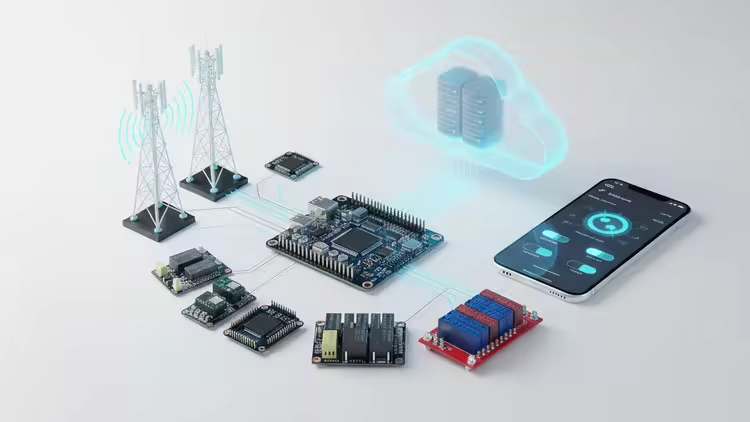
Industrial IoT Development with ESP32 MQTT, Node - red,APP

dkmdkm

U P L O A D E R
0a84ee902a47ea2e35ed592c04722d84.avif

Free Download Industrial IoT Development with ESP32 MQTT, Node-red,APP
Published 11/2025
MP4 | Video: h264, 1280x720 | Audio: AAC, 44.1 KHz, 2 Ch
Language: English | Duration: 9h 59m | Size: 5.3 GB
MQTT, Node-RED, Mobile Application, Touch Screens, Sensors... Real hardware, real projects

What you'll learn
ESP32 and Hardware: Setup the ESP32, manage Wi-Fi, and handle I2C, analog (ADS1115), and digital (PCF8574) I/O.
Communication Protocols: Master the fundamentals and advanced usage of MQTT (Publish/Subscribe/Callback).
Interface Development: Use the low-code visual programming tool Node-RED to manage complex data flows and create professional Dashboards (User Interfaces).
Mobile and Touch Interfaces: Integrate Nextion touch screens with ESP32 and develop functional Android applications using MIT App Inventor.
Data Acquisition: Read and integrate data from critical environmental sensors like SHT3x, SCD30, and SPS30 (Temperature, CO2, Dust).
Cloud Deployment (VPS): Install and securely configure Mosquitto (MQTT Broker) and Node-RED on DigitalOcean Virtual Private Servers.
Remote Connectivity Solutions: Connect the ESP32 to the internet and the Cloud MQTT server over cellular networks (GSM/GPRS) using SIM800L and LilyGo cards.
Remote Connectivity Solutions: Connect the ESP32 to the internet and the Cloud MQTT server over cellular networks (GSM/GPRS) using SIM800L and LilyGo cards. Ta
Requirements
Basic programming (C/C++ or Arduino) and electronics knowledge.
Description
This course teaches you how to build end-to-end professional IoT solutions, starting from basic ESP32 coding to deploying local (Node-RED) and cloud-based (DigitalOcean VPS) servers, enabling data exchange via GSM/Wi-Fi, and management through Nextion touch screens and functional Android applications.What You'll Learn? (Key Outcomes - Detailed Description)By the end of this comprehensive training, you will master the ability to transform an IoT project idea into a fully functional product equipped with a mobile app, a touch interface, and a 24/7 continuous Cloud Server infrastructure, effectively becoming an "IoT Developer from Designer to Distributor."In this course, you will bring two major, in-demand projects to life from the ground up:Smart Air Analyzer: You will learn how to read sensitive data from critical environmental sensors like SHT3x, SCD30, and SPS30 (Temperature, CO2, Dust, TVOC), process this data for visualization in Node-RED, and monitor it instantly via mobile/Nextion screens.8-Channel Relay Control System: You will gain experience controlling 8 separate outputs using the PCF8574 I/O expander, and configuring this automation system to be managed across both local networks and remote servers.Specialized Coverage Areas:Communication Power: You will grasp advanced MQTT usage, from the basic Publish/Subscribe logic to managing automatic reconnection on the ESP32.Cloud Mastery: You will conduct the entire setup and secure configuration of Mosquitto (MQTT Broker) and Node-RED from scratch on a DigitalOcean VPS. This enables you to run your projects globally and ensure seamless data flow regardless of your device's physical location.Network Flexibility: You will learn essential techniques for connecting the ESP32 to the internet and the Cloud MQTT server via cellular networks (GSM/GPRS) using SIM800L and LilyGo cards-a vital skill for areas with insufficient Wi-Fi.User Interfaces: You will design dynamic interfaces with Nextion touch screens, create professional Dashboards using the low-code visual programming tool Node-RED, and develop functional Android applications to control these projects using MIT App Inventor.Tangible Projects: Successfully run the Smart Air Analyzer and 8-Channel Relay Control systems with full automation, managing them from both local and cloud servers.
Who this course is for
Learners with basic Arduino or C++ skills interested in Industrial IoT and professional deployment strategies.
Anyone looking to develop not just local, but cloud-based (VPS/Server) solutions using the ESP32.
Developers who know MQTT and Node-RED but want to run them on real-world servers like DigitalOcean.
Developers who know MQTT and Node-RED but want to run them on real-world servers like DigitalOcean. Those who need to connect their devices to the internet using GSM/GPRS modules where Wi-Fi access is unavailable.
Hobbyists and engineers looking to add tangible, end-to-end, mobile/touch-interface projects like a Smart Air Analyzer and an 8-Channel Relay Control System to their portfolio.
Homepage
Code:
Bitte Anmelden oder Registrieren um Code Inhalt zu sehen!

Recommend Download Link Hight Speed | Please Say Thanks Keep Topic Live
Code:
Bitte Anmelden oder Registrieren um Code Inhalt zu sehen!

No Password - Links are Interchangeable
 
Kommentar
539499712_359020115_tuto.jpg

5.32 GB | 14min 23s | mp4 | 1280X720 | 16:9
Genre:eLearning |Language:English


Files Included :
FileName :4 - Local Node-RED Installation.mp4 | Size: (114.12 MB)
FileName :6 - Pre-Information for the Projects.mp4 | Size: (45.2 MB)
FileName :8 - Installing Arduino IDE MQTT Library - First Message Publishing.mp4 | Size: (91.36 MB)
FileName :1 - Installing ESP32 Support in Arduino IDE.mp4 | Size: (35.21 MB)
FileName :2 - What is MQTT Explanation.mp4 | Size: (25.86 MB)
FileName :3 - Installing Mosquitto MQTT Broker - Local Server.mp4 | Size: (81.41 MB)
FileName :5 - Local Node-RED Installation-2.mp4 | Size: (7.76 MB)
FileName :7 - ESP32 Wi-Fi Wireless Network Connection.mp4 | Size: (67.07 MB)
FileName :9 - Connection Check and Automatic Reconnection Program.mp4 | Size: (165.31 MB)
FileName :10 - Callback (MQTT Subscribe) Operations - Receiving the First Message.mp4 | Size: (73.77 MB)
FileName :11 - Two ESP32 Button-Lamp Application.mp4 | Size: (213.93 MB)
FileName :12 - Node-RED UI (Dashboard) Introduction.mp4 | Size: (48.86 MB)
FileName :1 - Adding ESP I2C PCF8574 (Hardware and Library).mp4 | Size: (120.5 MB)
FileName :2 - Node-RED - MQTT 8 Relay Control (Coding and Integration 1).mp4 | Size: (65.76 MB)
FileName :3 - Node-RED - MQTT 8 Relay Control Continued (Coding and Integration 2).mp4 | Size: (69.43 MB)
FileName :1 - SmartAir Analyzer Project Introduction (Goal and Scope).mp4 | Size: (24.98 MB)
FileName :2 - SHT3X Temperature Humidity Reading Program.mp4 | Size: (54.96 MB)
FileName :3 - CJMCU-811 TVOC eCO2 Reading Program.mp4 | Size: (48.14 MB)
FileName :4 - TLS2561 Light Intensity Reading Program.mp4 | Size: (37.07 MB)
FileName :5 - AS11-C Sound Intensity Reading Program.mp4 | Size: (131.98 MB)
FileName :6 - SCD30 CO2 Reading Program.mp4 | Size: (70.8 MB)
FileName :7 - SPS 30 DUST Reading Program.mp4 | Size: (73.17 MB)
FileName :8 - SEN0570 Smoke Reading Program.mp4 | Size: (68.79 MB)
FileName :9 - SmartAir Analyzer Final Look General Information.mp4 | Size: (122.37 MB)
FileName :10 - Adding Sensors to the Core Program - 1.mp4 | Size: (110.93 MB)
FileName :11 - Adding Sensors to the Core Program - 2.mp4 | Size: (82.65 MB)
FileName :12 - Adding Sensors to the Core Program - 3.mp4 | Size: (104.6 MB)
FileName :13 - Adding Sensors to the Core Program - 4.mp4 | Size: (53.15 MB)
FileName :14 - Adding Sensors to the Core Program - 5.mp4 | Size: (77.57 MB)
FileName :15 - Adding Sensors to the Core Program - 6.mp4 | Size: (76.97 MB)
FileName :16 - Adding Sensors to the Core Program - 7.mp4 | Size: (46.39 MB)
FileName :1 - SmartAir Analyzer 3D Design Information.mp4 | Size: (130.43 MB)
FileName :2 - SmartAir Analyzer Node-RED UI-1.mp4 | Size: (117.45 MB)
FileName :3 - SmartAir Analyzer Node-RED UI-2.mp4 | Size: (158.92 MB)
FileName :4 - SmartAir Analyzer Nextion - 1.mp4 | Size: (81.46 MB)
FileName :5 - SmartAir Analyzer Nextion - 2.mp4 | Size: (131.14 MB)
FileName :6 - SmartAir Analyzer Nextion - 3.mp4 | Size: (184.17 MB)
FileName :7 - SmartAir Analyzer Android APP - 1 (MIT App Inventor Introduction).mp4 | Size: (89.81 MB)
FileName :8 - SmartAir Analyzer Android APP - 2 (MQTT Connection).mp4 | Size: (88.42 MB)
FileName :9 - SmartAir Analyzer Android APP - 3 (Data Display).mp4 | Size: (102.53 MB)
FileName :1 - Relay Control Nextion - 1 (Screen Design).mp4 | Size: (136.45 MB)
FileName :2 - Relay Control Nextion - 2 (Communication Codes).mp4 | Size: (112.85 MB)
FileName :3 - Relay Control Node-RED UI (Dashboard Creation).mp4 | Size: (153.31 MB)
FileName :4 - Relay Control Android APP - 1 (MIT App Inventor Interface).mp4 | Size: (66.47 MB)
FileName :5 - Relay Control Android APP - 2 (MQTT Integration).mp4 | Size: (135.95 MB)
FileName :6 - Relay Control Android APP - 3 (Final Control Application).mp4 | Size: (42.89 MB)
FileName :1 - ESP32 PCF8574 - Digital INPUT - 1 (Input Reading).mp4 | Size: (66.96 MB)
FileName :2 - ESP32 PCF8574 - Digital INPUT - 2 (Monitoring with Node-RED UI).mp4 | Size: (157.14 MB)
FileName :3 - ESP32 ADS1115 - Analog Input (High Precision Reading).mp4 | Size: (111.85 MB)
FileName :1 - ESP32 OLED Library.mp4 | Size: (75.46 MB)
FileName :2 - ESP32 OLED - Text Operations.mp4 | Size: (86.66 MB)
FileName :3 - ESP32 OLED - Text - Font Operations.mp4 | Size: (56.2 MB)
FileName :4 - ESP32 OLED - Bitmap - 1.mp4 | Size: (97.96 MB)
FileName :5 - ESP32 OLED - Bitmap - 2 DHT11 Temperature Humidity Display.mp4 | Size: (116.92 MB)
FileName :6 - ESP32 OLED - Animation - Program Introduction.mp4 | Size: (47.99 MB)
FileName :1 - Installing MQTT Broker on DigitalOcean VPS.mp4 | Size: (111.41 MB)
FileName :2 - Installing Node-RED on DigitalOcean VPS-1.mp4 | Size: (37.9 MB)
FileName :3 - Installing Node-RED on DigitalOcean VPS-2.mp4 | Size: (17.01 MB)
FileName :4 - Installing Node-RED on DigitalOcean VPS-3.mp4 | Size: (24.61 MB)
FileName :1 - MQTT connection with ESP32 and the SIM800L module.mp4 | Size: (103.85 MB)
FileName :2 - MQTT connection with the ESP32-LILYGO GSM devkit.mp4 | Size: (118.15 MB)
]
Screenshot
2oBppZaT_o.jpg


RapidGator
Code:
Bitte Anmelden oder Registrieren um Code Inhalt zu sehen!
NitroFlare
Code:
Bitte Anmelden oder Registrieren um Code Inhalt zu sehen!
DDownload
Code:
Bitte Anmelden oder Registrieren um Code Inhalt zu sehen!
 
Kommentar

In der Börse ist nur das Erstellen von Download-Angeboten erlaubt! Ignorierst du das, wird dein Beitrag ohne Vorwarnung gelöscht. Ein Eintrag ist offline? Dann nutze bitte den Link  Offline melden . Möchtest du stattdessen etwas zu einem Download schreiben, dann nutze den Link  Kommentieren . Beide Links findest du immer unter jedem Eintrag/Download.

Data-Load.me | Data-Load.ing | Data-Load.to | Data-Load.in

Auf Data-Load.me findest du Links zu kostenlosen Downloads für Filme, Serien, Dokumentationen, Anime, Animation & Zeichentrick, Audio / Musik, Software und Dokumente / Ebooks / Zeitschriften. Wir sind deine Boerse für kostenlose Downloads!

Ist Data-Load legal?

Data-Load ist nicht illegal. Es werden keine zum Download angebotene Inhalte auf den Servern von Data-Load gespeichert.
Oben Unten