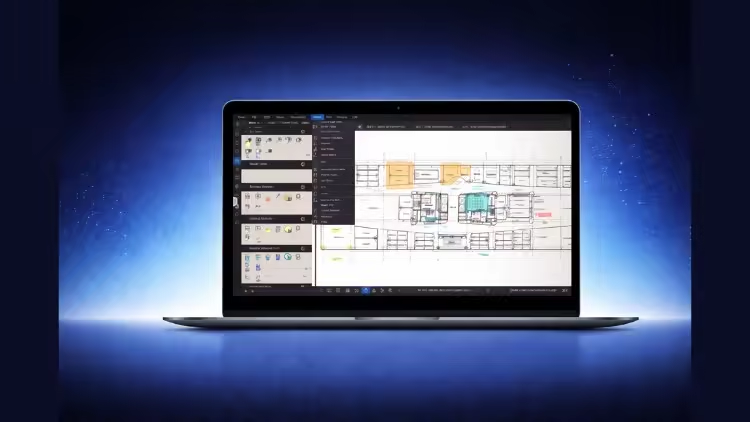
Bluebeam Revu Quantity Takeoff & Excel Workflow for QS

dkmdkm

U P L O A D E R
d6296700353c9e06efef9c4b79e8298b.avif

Free Download Bluebeam Revu Quantity Takeoff & Excel Workflow for QS
Published 12/2025
MP4 | Video: h264, 1920x1080 | Audio: AAC, 44.1 KHz, 2 Ch
Language: English | Duration: 4h 22m | Size: 4.5 GB
Learn quantity estimation and takeoff in Bluebeam Revu and organize quantities in Excel using custom columns and formula

What you'll learn
Perform accurate quantity takeoff in Bluebeam Revu using area, volume, length, and count tools on real construction drawings.
Organize takeoff data using layers, subjects, and markups to keep quantities clean, structured, and ready for export.
Export quantities from Bluebeam to Excel and prepare professional worksheets using custom columns and reusable formulas.
Apply a real-world Bluebeam-to-Excel workflow used by quantity surveyors and estimators for practical construction projects.
Requirements
No prior Bluebeam or quantity takeoff experience is required. Basic knowledge of construction drawings and a computer with Bluebeam Revu and Microsoft Excel installed is sufficient.
Description
Quantity estimation and takeoff are essential skills for anyone working in civil engineering and construction. This course is designed to help you learn practical quantity estimation and takeoff using Bluebeam Revu, and then organize your quantities properly in Excel for real project use.The course is suitable for beginners, fresh graduates, and professionals who want a clear and structured workflow without unnecessary complexity. You will start by learning the Bluebeam Revu interface and correct project setup, including scaling, which is critical for accurate results.You will then move step by step through all major takeoff tools such as length, area, volume, count, and dynamic fill. These tools are applied on real drawings to perform quantity takeoff for foundations, columns, grade beams, slabs, stairs, brickwork, plaster, and tiles.To strengthen learning, practice questions are included in the course. These allow you to apply what you have learned, test your understanding, and build confidence in performing takeoff independently.After completing takeoff in Bluebeam, the course guides you on how to export quantities to Excel and prepare clean worksheets using custom columns and formulas. This helps you organize data professionally and prepares you for estimation, BOQs, or further analysis.The focus of this course is on correct workflow, clarity, and real-world application, following the same approach used by quantity surveyors and estimation engineers in professional practice.What You Will Learn• How to perform quantity estimation and takeoff using Bluebeam Revu• How to use length, area, volume, count, and dynamic fill tools correctly• How to apply takeoff on real construction drawings• How to organize quantities using layers and markups• How to export takeoff data from Bluebeam to Excel• How to prepare Excel sheets using custom columns and formulas• How to practice and verify your understanding using included practice questions• How to follow a professional Bluebeam to Excel estimation workflow
Who this course is for
Professionals new to Bluebeam Revu who want a clear, step-by-step workflow without jumping into full BBS or advanced scheduling.
Site engineers and planning engineers who need to extract quantities from drawings and organize them professionally in Excel.
Quantity surveyors and estimators looking to improve accuracy and speed in takeoff and Excel-based workflows.
Civil engineering students and fresh graduates who want to learn practical quantity takeoff using Bluebeam Revu and Excel.
Homepage
Code:
Bitte Anmelden oder Registrieren um Code Inhalt zu sehen!

Recommend Download Link Hight Speed | Please Say Thanks Keep Topic Live
Code:
Bitte Anmelden oder Registrieren um Code Inhalt zu sehen!

No Password - Links are Interchangeable
 
Kommentar
539499712_359020115_tuto.jpg

4.51 GB | 24min 51s | mp4 | 1920X1080 | 16:9
Genre:eLearning |Language:English


Files Included :
FileName :1 Bluebeam Revu User Interface Overview.mp4 | Size: (400.49 MB)
FileName :2 Resources To Download.mp4 | Size: (619.18 KB)
FileName :3 How to Open a Project and Set Drawing Scale.mp4 | Size: (240.42 MB)
FileName :4 Length Tool for Linear Takeoff (Important For Beginners).mp4 | Size: (190.03 MB)
FileName :5 Polylength Tool for Multiple Segments.mp4 | Size: (150.55 MB)
FileName :6 Perimeter Tool Explained.mp4 | Size: (76.79 MB)
FileName :7 Area Tool for Surface Quantities.mp4 | Size: (76.87 MB)
FileName :8 Polygon and Ellipse Cutout for Openings.mp4 | Size: (55.85 MB)
FileName :9 Diameter and Angle Measurement Tools.mp4 | Size: (66.92 MB)
FileName :10 Volume Tool for Concrete and Earthwork.mp4 | Size: (44.31 MB)
FileName :11 Count Tool for Fixtures and Repetitive Items.mp4 | Size: (33.4 MB)
FileName :12 Dynamic Fill Tool for Fast Area Takeoff.mp4 | Size: (51.64 MB)
FileName :13 Exporting Quantities and Data to Excel.mp4 | Size: (104.09 MB)
FileName :14 Excavation Quantity for Foundations.mp4 | Size: (591.11 MB)
FileName :15 PCC Quantity for Foundations.mp4 | Size: (101.66 MB)
FileName :16 Formwork Quantity for Foundations.mp4 | Size: (104.85 MB)
FileName :17 Concrete Quantity for Foundations.mp4 | Size: (58.25 MB)
FileName :18 Practice Question For This Module (Important).mp4 | Size: (21.99 MB)
FileName :19 Formwork and Concrete for Column Necks.mp4 | Size: (105.26 MB)
FileName :20 Practice Question For This Module ( Very Important ).mp4 | Size: (6.02 MB)
FileName :21 Formwork Quantity for Grade Beams.mp4 | Size: (325.23 MB)
FileName :22 Concrete Quantity for Grade Beams.mp4 | Size: (121.05 MB)
FileName :23 Concrete Quantity for Slab on Grade.mp4 | Size: (108.07 MB)
FileName :24 Practice Question (Very Important).mp4 | Size: (16.1 MB)
FileName :25 Exporting Quantity Data from Bluebeam to Excel.mp4 | Size: (203.13 MB)
FileName :26 Formwork and Concrete for Columns (Superstructure).mp4 | Size: (196.95 MB)
FileName :27 Formwork Quantity for Stairs.mp4 | Size: (252.95 MB)
FileName :28 Formwork Quantity for Slab.mp4 | Size: (156.78 MB)
FileName :29 Practice Question For This Module.mp4 | Size: (11.64 MB)
FileName :30 Brickwork Quantity Takeoff in Bluebeam.mp4 | Size: (306.51 MB)
FileName :31 Plaster Quantity Takeoff in Bluebeam.mp4 | Size: (156.26 MB)
FileName :32 Tiles Quantity Takeoff for Toilets.mp4 | Size: (113.9 MB)
FileName :33 Practice Question For This Module.mp4 | Size: (7.78 MB)
FileName :34 Practice Question 2 For This Module.mp4 | Size: (5.93 MB)
FileName :35 Creating Custom Columns and Material Tags in Bluebeam.mp4 | Size: (151.62 MB)
]
Screenshot
VAIzByzX_o.jpg


RapidGator
Code:
Bitte Anmelden oder Registrieren um Code Inhalt zu sehen!
NitroFlare
Code:
Bitte Anmelden oder Registrieren um Code Inhalt zu sehen!
DDownload
Code:
Bitte Anmelden oder Registrieren um Code Inhalt zu sehen!
 
Kommentar

In der Börse ist nur das Erstellen von Download-Angeboten erlaubt! Ignorierst du das, wird dein Beitrag ohne Vorwarnung gelöscht. Ein Eintrag ist offline? Dann nutze bitte den Link  Offline melden . Möchtest du stattdessen etwas zu einem Download schreiben, dann nutze den Link  Kommentieren . Beide Links findest du immer unter jedem Eintrag/Download.

Data-Load.me | Data-Load.ing | Data-Load.to | Data-Load.in

Auf Data-Load.me findest du Links zu kostenlosen Downloads für Filme, Serien, Dokumentationen, Anime, Animation & Zeichentrick, Audio / Musik, Software und Dokumente / Ebooks / Zeitschriften. Wir sind deine Boerse für kostenlose Downloads!

Ist Data-Load legal?

Data-Load ist nicht illegal. Es werden keine zum Download angebotene Inhalte auf den Servern von Data-Load gespeichert.
Oben Unten